
SEOUL — The button is gone. But the protection it offered is no longer optional.
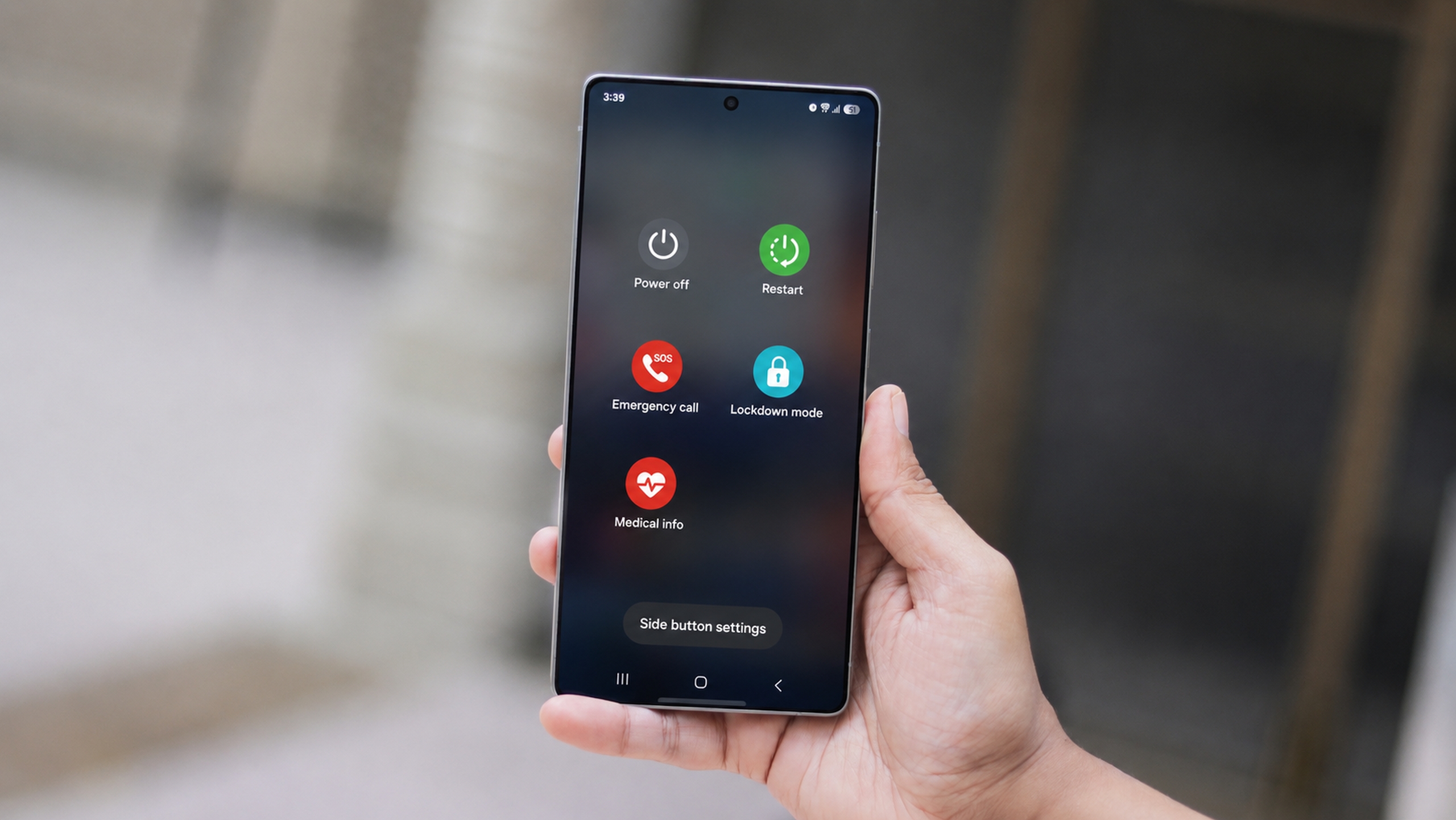
Samsung’s One UI 9, currently in its second beta release and based on Android 17, has quietly removed the dedicated Lockdown Mode toggle from the Galaxy power menu. The company has not announced the change with any fanfare. What it has done is make the underlying security behavior automatic: the moment a user opens the power menu on a running device, the phone enters Lockdown Mode on its own, regardless of whether the screen was already unlocked.
That might sound like a minor software housekeeping decision. It is not. It addresses a gap in Galaxy device security that has existed, largely unacknowledged, through multiple generations of One UI.
Under previous versions of One UI, Lockdown Mode had to be triggered deliberately. A user had to recognize the threat, open the power menu, locate the Lockdown button among the power-off and restart options, and tap it. In the roughly five seconds that process takes, a thief who has grabbed an unlocked phone could shut it down entirely before the owner could respond — severing Find My Device tracking, erasing cellular data connectivity, and rendering remote-lock commands useless. The phone would go dark before Samsung’s servers ever registered its last known location.
One UI 9 collapses that window to zero. SamMobile reported that on devices running the current beta, biometric authentication is disabled and a PIN or password becomes the only unlock method as soon as the power menu appears. Fingerprint recognition and face unlock are both suspended. The phone does not wait for the user to make a decision. The security state engages the instant the menu does.
The practical implication is significant for the specific scenario that drives most urban smartphone theft: the opportunistic snatch. Someone grabs a phone that is already in active use. Their first instinct, before anything else, is to reach for the power button to shut the device down and prevent tracking. Under One UI 9, that power-button press now triggers the protection it was previously meant to bypass.
The space in the power menu previously occupied by the Lockdown button has been replaced with “Medical info,” a shortcut that surfaces emergency contact details and health information when the phone is locked. That addition signals something about Samsung’s underlying logic here: the power menu is increasingly being treated as an emergency-response surface rather than a settings shortcut. Lockdown is no longer a feature you invoke. It is the default state of the menu itself.
Samsung has not issued a public explanation for the change, and it remains unclear whether the behavior will survive into the stable One UI 9 release unchanged. 9to5Google noted that the feature is live in beta 2 specifically. Beta software has historically been an unreliable guide to final behavior on One UI releases, and Samsung has reversed changes between beta and stable before. The design decision may be refined, softened, or explained more clearly before it ships to the full Galaxy install base.
What is not in question is the direction Samsung is moving. The company has spent the last two One UI generations tightening the window between a phone being grabbed and that phone becoming untraceable. One UI 8.5 pushed Galaxy AI capabilities to older hardware at scale; One UI 9 appears focused on closing behavioral security gaps that existing features never quite addressed. Lockdown has always been the right response to the power-button threat. Making it the default response, rather than a deliberate one, is a different kind of design choice entirely.
The tradeoff, at least on paper, is usability. Anyone who opens the power menu to restart a malfunctioning app or check the device’s emergency SOS options now has to re-enter a PIN to continue using the phone. Whether that friction registers as meaningful to Galaxy users depends heavily on how frequently they access the power menu in ordinary use. For most people, that is infrequently enough that the annoyance may be negligible. For some, especially those who rely on biometrics as their primary unlock method and reach for the power menu often, it will be a noticeable change to daily behavior.
The shift also raises a question that Samsung has not yet answered: whether users will have any option to modify the behavior. Android itself includes a Lockdown Mode that can be accessed by long-pressing the power button. One UI 9’s approach supersedes that with a layer of automatic enforcement. Whether the final release gives users granular control over that enforcement, or treats it as non-negotiable security policy, remains to be seen.
One UI 9 is expected to launch alongside Android 17 later this year, with Galaxy S-series devices likely among the first to receive the stable release.